
Our product · Runs on your machine
Cronable
Describe it — the AI builds it.
Say what you want automated in plain English and the built-in AI assistant builds the whole pipeline, wiring the steps together and connecting the tools you already use. It runs on your own machine, on a schedule or a trigger, where it can reach your files and CLIs — while your data and keys never leave your box.
- No code needed
- Runs on your machine
- Mac, Windows or your own server
Built by AI, no code
Tell the assistant what you want in plain English. It builds the pipeline, wires each step to the next, and asks for anything it is missing — no YAML required.
Runs on your machine
A job reaches your files, your network and your signed-in CLIs — and can install what it needs and run real commands, not just call pre-built integrations.
Success-gated chains
Every step waits for its parent to actually succeed, a failure branches to a handler instead of poisoning everything downstream, and output flows into the next step.
Your data & keys stay put
Nothing is copied to a vendor cloud. AES-256-GCM secrets at rest, masked from every log, per-user logins or OIDC — you hold the keys.
The console you'll actually use.
Real screenshots of the Cronable web console — the same app you install on your own machine.
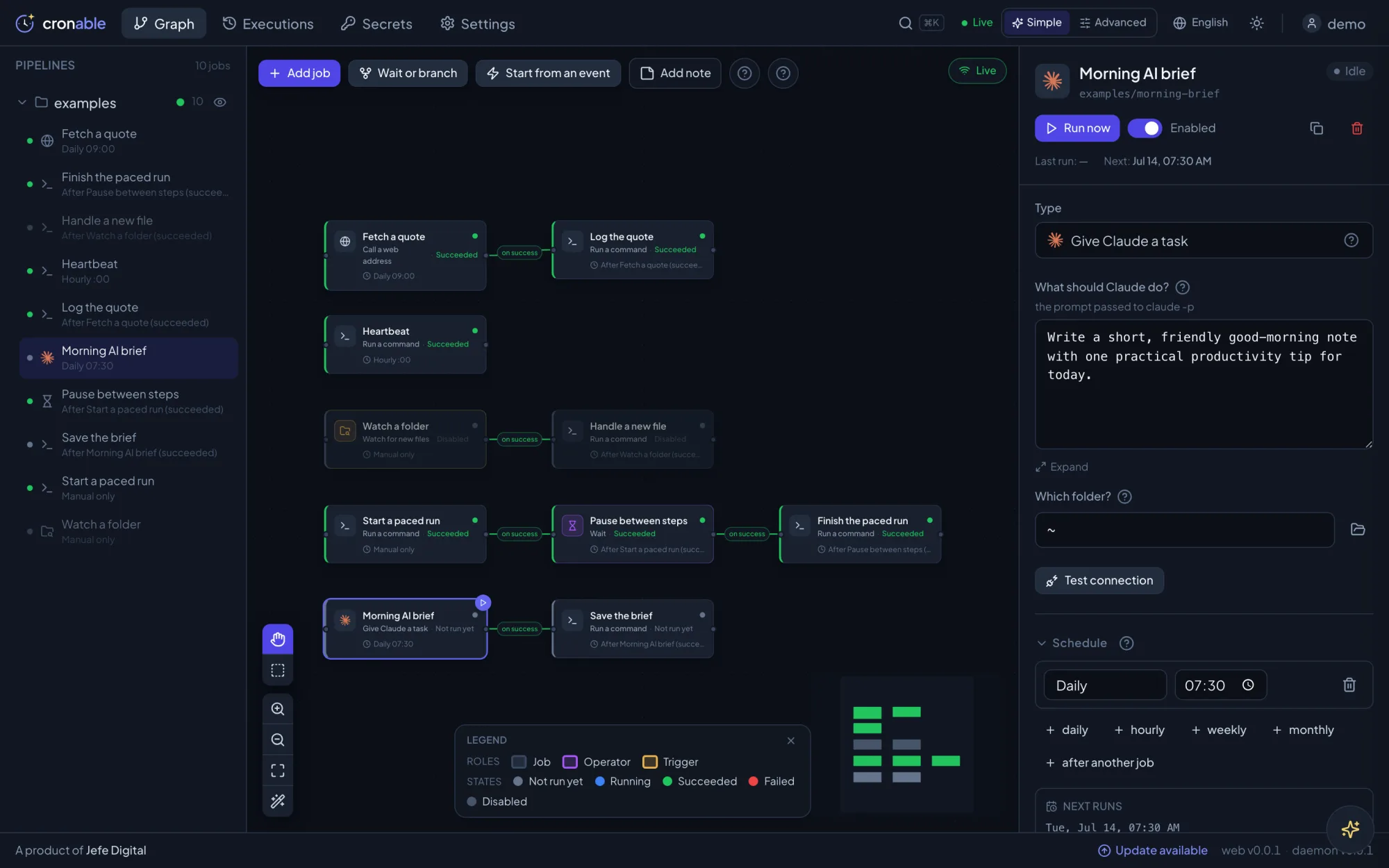
Your whole operation, as a graph
Every job is a card. An arrow means “only run if the last step succeeded.” Build chains and branching trees by dragging — the friendly Simple mode keeps the jargon out of the way.
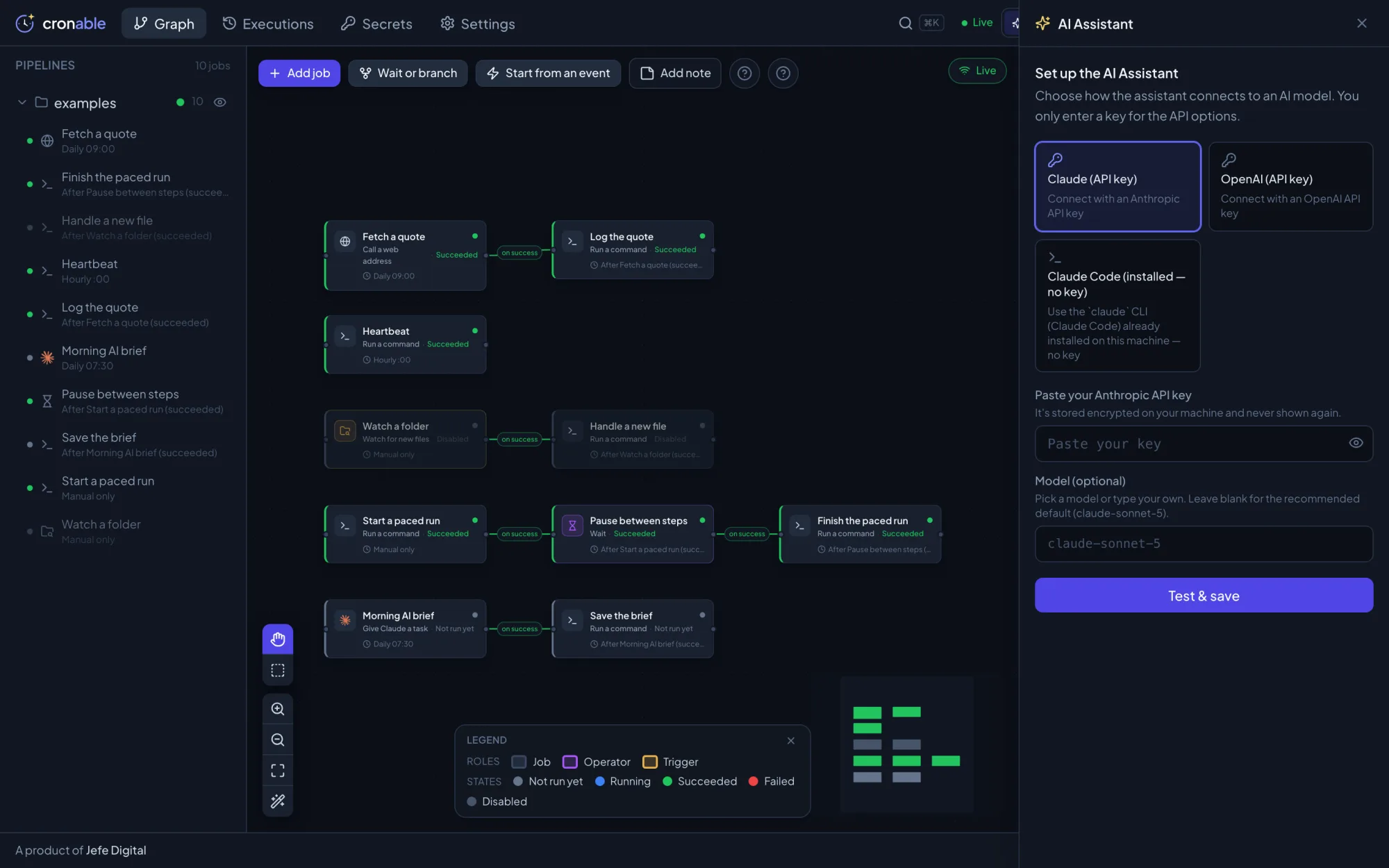
A built-in AI assistant, on your terms
Connect the assistant to your own Claude or OpenAI key — or the Claude Code CLI already on your machine, so no key is needed and nothing leaves the box.
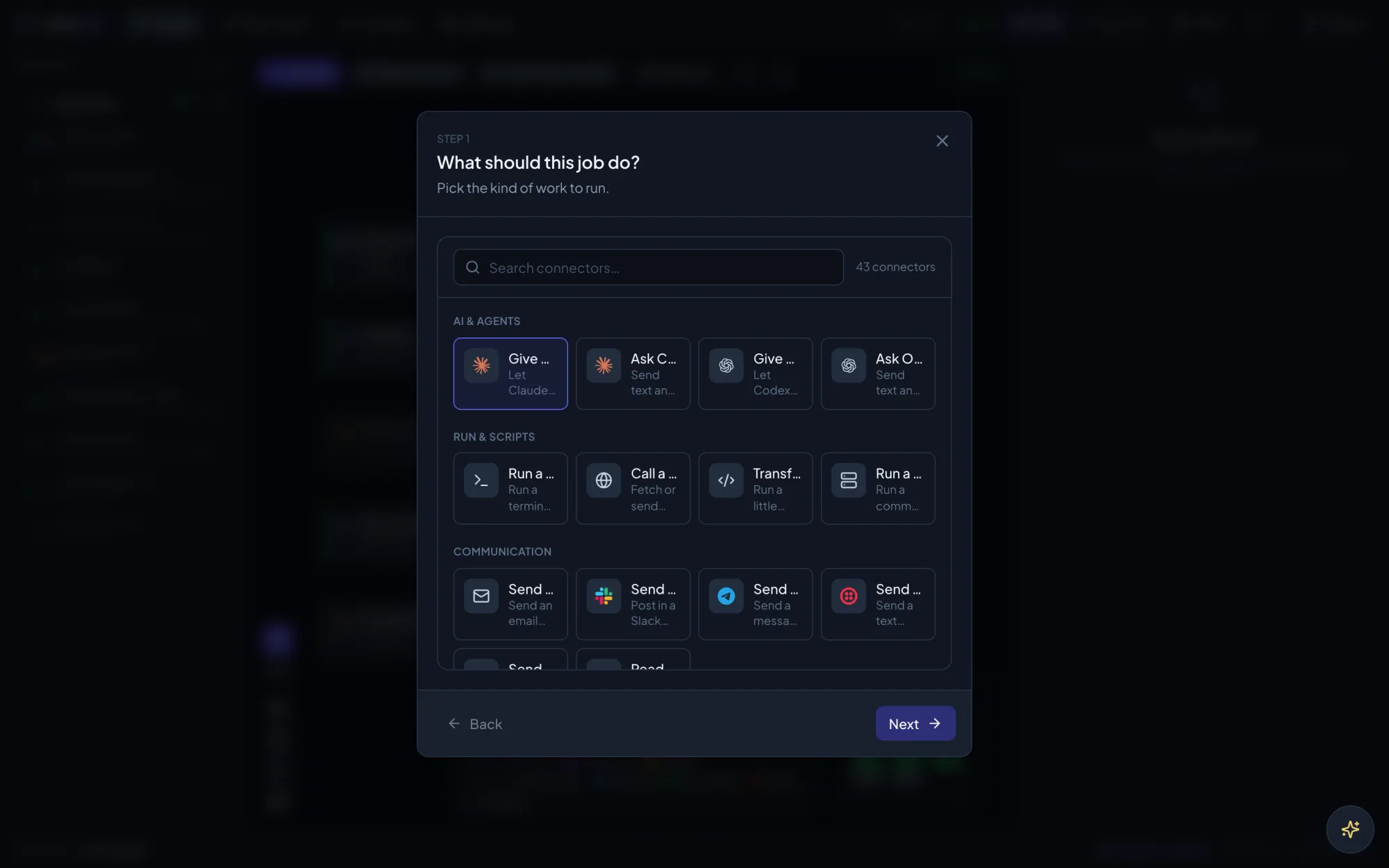
Set up a job by answering plain questions
The guided wizard asks “what should this job do?” — run a command, give Claude a task, call a web address. Pick one and fill in the blanks.
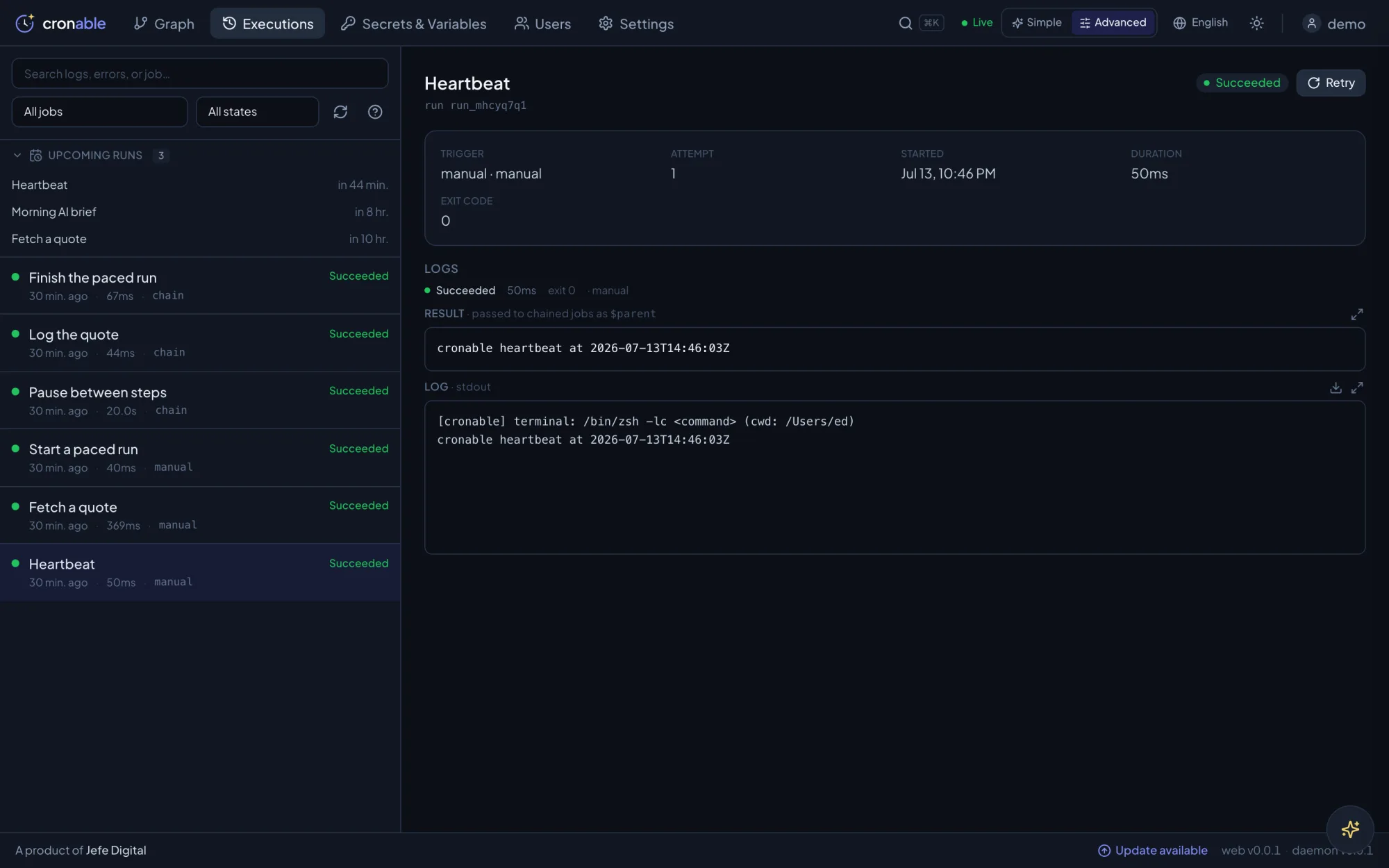
Watch every run — and why it failed
Live, colour-coded run history with the logs attached, so you always know what ran, when, and what happened.
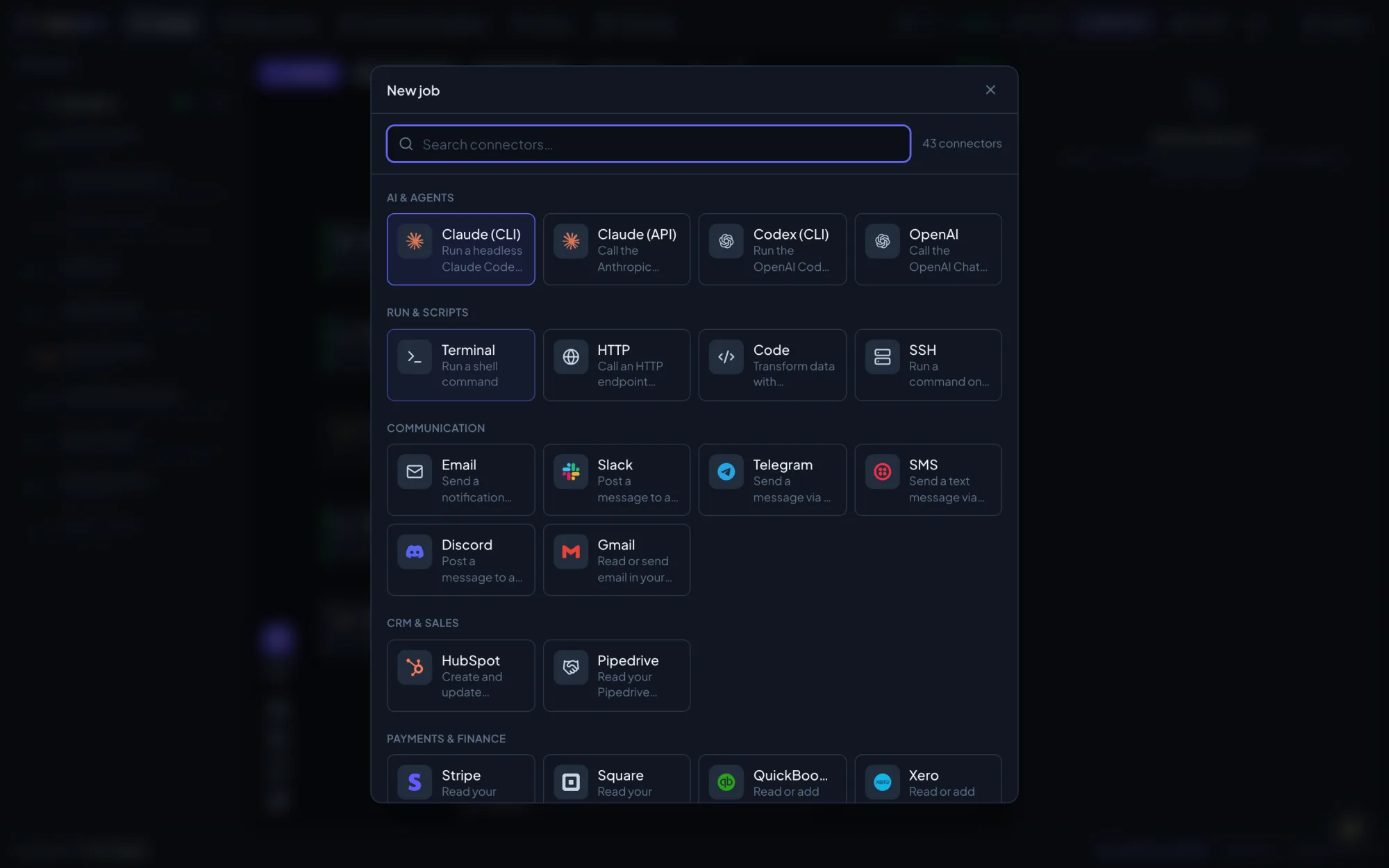
94 connectors, one search box
Add a job from a growing catalog — run Claude or a shell command, call any HTTP API, or reach Slack, Telegram, Gmail, Stripe and more. Grouped and searchable.
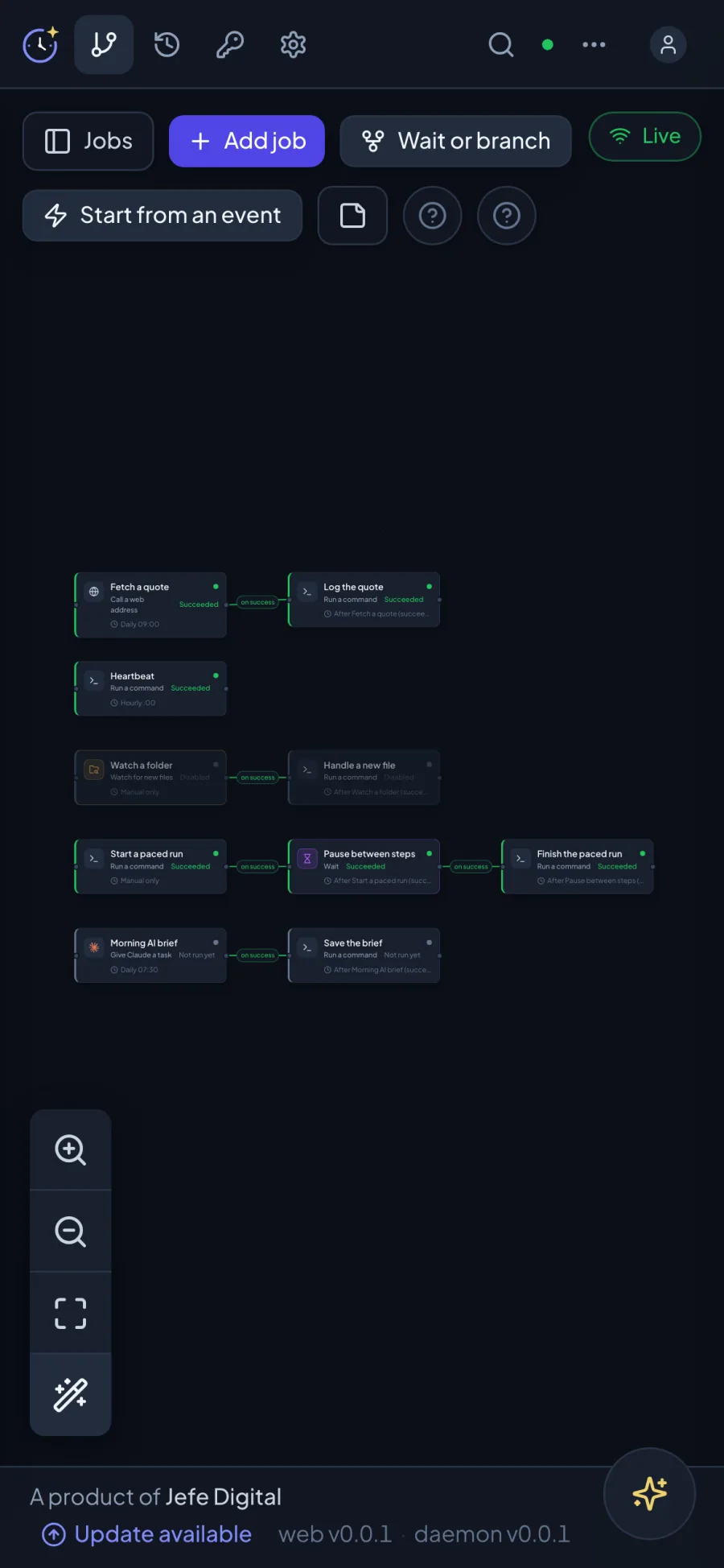
On your phone, too
The whole console is responsive — check a run or kick off a job from anywhere.
120 job types — and room for your own.
Actions do the work, orchestration nodes pause and branch the chain, and triggers fire whole pipelines from an inbox, a folder, a calendar or a webhook. Need something bespoke? Ship it as an extension.
AI
claudeClaude (API & CLI)Run Claude headlessly through the Claude Code CLI on your own box — under your own AI account.
codexCodex (CLI)Point Codex at a repo and a prompt, hands-off on a schedule or a trigger.
geminiGemini (CLI)Run Google Gemini the same way, from the CLI already on your machine.
openaiOpenAICall OpenAI models on your own key — calls go straight to your provider.
ollamaLocal model (Ollama)Run a model entirely offline on your own hardware — nothing leaves the box.
assistantAI assistant (scheduled)Put the built-in assistant itself on a schedule to build and adjust work for you.
Actions
terminalTerminalExecute any shell command or script, secrets injected, output captured.
nodeNode.jsRun a Node script with your own dependencies, right where your files are.
sshSSHReach another machine on your network and run the work there.
httpHTTPCall any API and chain the JSON response downstream.
codeCodeTransform data with sandboxed JavaScript between steps.
databaseDatabaseRun SQL against Postgres, MySQL or SQL Server — rows flow downstream.
gitGitPull, commit and push repositories on a schedule.
fileFileMove files between your box, SFTP, S3 and your cloud drives.
Orchestration
waitWaitPause a chain for minutes or days — durably, holding no capacity.
switchSwitchRoute by any value — only the matching branch fires.
filterFilterStop the chain unless the data passes your condition.
for-eachFor eachFan a list out across the rest of the pipeline, item by item.
collectCollectGather the branches back into one payload before continuing.
Triggers
webhookWebhookAccept inbound triggers from CI, forms or external systems.
inboxInboxFires on new mail in an IMAP, Gmail or Outlook mailbox.
folder-watchFolder watchFires when a file lands in a watched directory.
calendarCalendar watchFires ahead of an upcoming Google or Outlook calendar event.
evmEVM event watchFires on an on-chain event from any EVM network.
94 connectors
Plus Custom — build your own job types as self-contained extensions, installed in a click. See all 94 connectors on cronable.ai.
The next step runs only when the last one actually worked.
Plain cron — and a scheduled task inside a chat agent — fire on the clock and hope. Cronable builds real dependency chains and trees: every step waits for its parent to succeed, a failure branches to a handler instead of poisoning everything downstream, and each step's output flows into the next.
- Runs only on success
- Branch on failure
- Fan out into trees
- Durable waits between steps
- Output flows downstream
Local isn't just more private. It's more capable.
Your machine is already wired into your files, network and signed-in tools — and it can do anything a computer can. Cronable runs right there, so a job inherits all of it.
Already wired into everything you use
Your files, your VPNs, your local network, your signed-in CLIs — a job on your machine inherits all of it instantly. No re-authenticating every account into someone else’s platform.
A full computer, not a fixed menu
Cloud tools can only connect what their vendor pre-built. On your machine a job can write a script, install what it needs on the fly, and do the thing that has no integration — which is most real work.
Your data stays on your box
Your data, prompts, credentials and results stay on hardware you control — not copied to a vendor cloud. Your workflows and secrets never ride along.
Three ways to run it.
However you like to work, you're up and running in minutes. The engine runs on your own machine — your jobs, secrets and AI accounts stay right there.
Mac desktop app
Download it and double-click. It runs quietly in your menu bar and manages the engine for you — no terminal, no config.
Windows desktop app
Lives in your system tray and keeps the engine running in the background — the same one-click experience as the Mac app.
Server or headless
For an always-on box, install from the command line on macOS or Linux and operate it from anywhere through the same dashboard.
Your infrastructure. Your data. Your keys.
Cronable is built to run like a trusted part of your own stack — your data, jobs and secrets stay on your box.
Runs on-premises
Install on your own machine, server or VM — your jobs run on your infrastructure, not our cloud. No SaaS in the middle.
Encrypted secrets
AES-256-GCM at rest, never written to git, and masked out of every log line.
Authenticated console
Per-user logins or OIDC single sign-on, with brute-force lockout; the engine binds to localhost.
You hold the keys
Your data and encryption keys stay with you. Every change lands in git and an audit trail.
Run Cronable on your own infrastructure.
Install the Mac or Windows app yourself in minutes — or have us come in, map what to automate, build the workflows with you, and train your team to run them.